

Apple’s Servers are employed to send Phishing Emails using iCloud Calendar
Apple’s Servers are employed to send Phishing Emails using iCloud Calendar
In order to send callback phishing emails that seem like purchase notifications straight from Apple’s email servers, iCloud Calendar invites are being misused. This increases the likelihood that the emails will get past spam filters and reach their targets’ inboxes.

An email purporting to be a payment receipt for $599 debited to the recipient’s PayPal account was shared by a reader with News4Hackers earlier this month. A phone number was included in this email in case the receiver wished to talk about the payment or make any modifications.
“Hello Customer, Your PayPal account has been billed $599.00. We’re confirming receipt of your recent payment,” the email said.
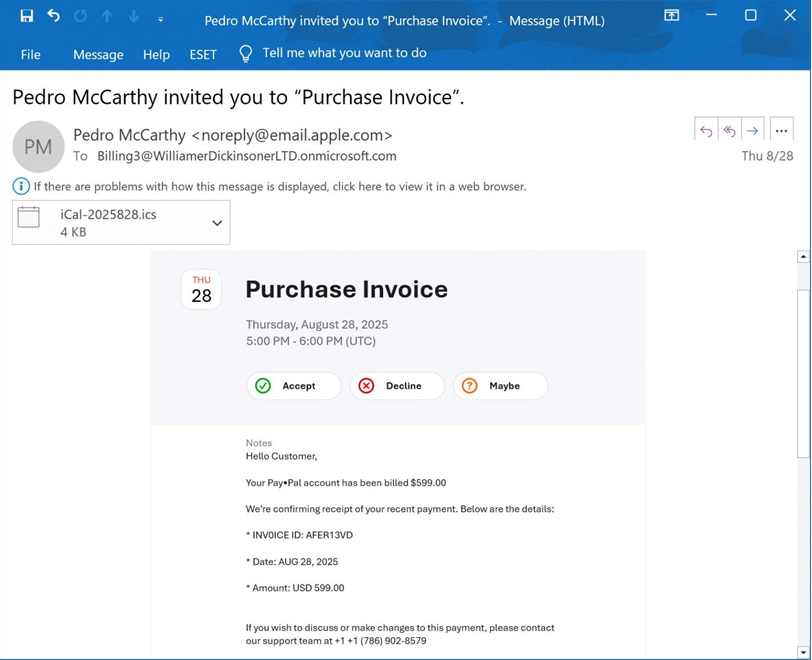
iCloud Calendar invites used for phishing emails
“If you wish to discuss or make changes to this payment, please contact our support team at +1 +1 (786) 902-8579. Contact us to cancel +1 (786) 902-8579,” continued the email.
These emails aim to terrify recipients into calling the scammer’s “support” phone number by making them believe that their PayPal account was fraudulently charged for a purchase.
Scammers will attempt to scare you into believing that your account was compromised or that they need to connect to your computer in order to start the refund process, requesting that you download and run software.
However, this remote access was used to install malware, steal data from the computer, or steal money from bank accounts in similar frauds in the past.
Abusing iCloud Calendar invites to send emails
Although the email’s bait is a standard callback phishing scam, it was odd because it was sent from noreply@email.apple.com and passed the SPF, DMARC, and DKIM email security checks, indicating that it was authentically from Apple’s mail server.
| Authentication-Results: spf=pass (sender IP is 17.23.6.69)
smtp.mailfrom=email.apple.com; dkim=pass (signature was verified) header.d=email.apple.com;dmarc=pass action=none header.from=email.apple.com; |
As you can see from the phishing email above, the threat actor placed the phishing text in the Notes box of an iCloud Calendar invite before inviting a Microsoft 365 email account under their control.
An email invitation is issued from Apple’s servers at email.apple.com from the iCloud Calendar owner’s name using the email address “noreply@email.apple.com” once the event has been created and external parties have been invited.

“Billing3@WilliamerDickinsonerLTD.onmicrosoft.com” is the Microsoft 365 account to which News4Hackers was able to view the invitation.
The Microsoft 365 email address to which the invitation is issued is thought to be a mailing list that automatically distributes every email it gets to all other group members, much like a prior phishing attempt that made use of PayPal’s “New Address” feature.
In this instance, the phishing scam targets the members of the mailing list.
If the email is forwarded by Microsoft 365, it will typically fail SPF email checks because it was originally sent from Apple’s email servers.
Microsoft 365 avoids this by rewriting the Return path to a Microsoft-affiliated address using the Sender Rewriting Scheme (SRS), which enables it to pass SPF tests.
| Original Return-Path: noreply@email.apple.com
Rewritten Return-Path: bounces+SRS=8a6ka=3I@williamerdickinsonerltd.onmicrosoft.com |
Although the phishing lure itself isn’t very unique, the misuse of Apple’s email servers, an Apple email address, and the genuine iCloud Calendar invite feature gives the email legitimacy and may help it get past spam filters because it appears to be from a reliable source.
Generally speaking, you should proceed with care if you receive an unexpected calendar invite that contains an odd message.
News4Hackers emailed Apple regarding this scam, but we never got any reply back.

About The Author:
Yogesh Naager is a content marketer who specializes in the cybersecurity and B2B space. Besides writing for the News4Hackers blogs, he also writes for brands including Craw Security, Bytecode Security, and NASSCOM.
READ MORE HERE
Meerut Police Nabbed Illegal International Call Networks and Shut Them Down
About Author








 English