

Police Alert the Public about a New Year’s Greeting Scam that is Going Around on WhatsApp

Scammers have stepped up their game this holiday season, delivering APK files that might take over your phone in the shape of New Year’s texts or pictures. We explain how to protect yourself from harmful APK files in this edition of The Safe Side.
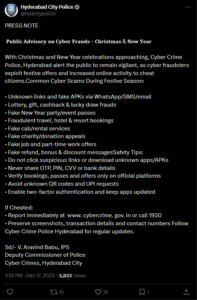
Ahead of the festivities, the Hyderabad cybercrime police have sent out a warning to the public about bogus New Year greeting links that are being extensively shared on WhatsApp. They caution that clicking on these links could compromise personal and financial information.
According to police, users could get messages that purport to give digital goods or personalized New Year’s greeting cards, frequently asking recipients to click a link to access the material. According to officials, these URLs usually cause malicious APK files to download and infect mobile phones with malware or spyware.
Once installed, the malicious software can provide hackers access to contact lists, photo galleries, bank accounts, and one-time passwords, resulting in financial loss and the exploitation of personal data, according to authorities.
The public has been cautioned by cybercrime authorities not to click on unknown or dubious links, especially those that require users to install or update a program in order to view greetings. People were instructed to limit their access to photographs, videos, and plain text communications sent by reliable individuals.
Officials urged the public to be wary and vigilant as the New Year draws near, stating that increased scam activity is typical during holiday seasons.
What is an APK file?
Similar to an .exe file on a Windows computer, an Android Package Kit, or APK, is a file used to install apps on smartphones, particularly Android phones. It is a single file that includes everything a program needs to function.
Apps can typically be downloaded securely from the Google Play Store. However, APK files can also be exchanged using apps like WhatsApp, SMS, or even email, or downloaded from other websites. We refer to this as sideloading.
Sideloading is dangerous, even if it can occasionally be helpful. The APK may contain malware that can access your phone, steal personal data, or result in financial loss if it comes from an unidentified or unreliable source. Because of this, APK files should only be installed if the source can be completely trusted, and they should preferably never be downloaded from links or messages.
To learn more about how APK files target gullible consumers and how internet users can protect themselves from these attacks, News4Hackers spoke with cyber specialists.
Mohit Yadav, a cyber specialist and a renowned media panelist for more than 12 reputed media houses, and founder and director at Craw Security, described how the fraud targets gullible people.
“Happy New Year 2025!” is the standard greeting that the scam begins with on WhatsApp. To view your unique greeting, click this link. It looks to be from a friend, coworker, distant relative, or acquaintance, but it can also come from an unknown number. In numerous instances that I have examined, the attackers disseminated the link via hacked WhatsApp accounts, giving the message an air of legitimacy,” he stated.
The user is taken to a joyous webpage featuring animations, fireworks, and New Year’s wishes in both Hindi and English when they click on the link. The user is then prompted by the website to download an app in order to “view” the greeting. The Google Play Store is not the source of this app. The catch is that it is an APK file hosted somewhere else, according to Yadav.
What is malware?
Malicious software, or malware, is intrusive software created by cybercriminals with the intention of stealing data or causing system damage. Viruses, worms, Trojan viruses, spyware, adware, ransomware, etc., are examples of common malware.
What happens after the APK is installed?
As per Mr. Yadav, after the app is installed, it asks for rights that are absurd for a greeting card:
- Access to SMS messages
- Permission to read notifications
- Access to contacts and storage
This access has been utilized in documented instances throughout India to:
- Examine the OTPs that banks and payment apps send.
- Keep an eye on transaction alerts
- Take control of WhatsApp accounts and transmit the fraudulent link again.
- Steal contact lists in order to intensify the assault.
In one instance, a user from North India witnessed several tiny UPI transactions in a matter of hours after installing a New Year’s greeting app. Attackers were able to progressively test and deplete the account in order to evade detection because the malware had intercepted OTPs. One hijacked phone was used as a distribution hub for the fraud when a victim’s WhatsApp account started automatically distributing New Year’s links to all contacts, including family groups, in another metro city, according to Mohit Yadav.
Why does this scam work well in India?
Such attacks continue to be successful for a number of reasons, particularly in India, according to Yadav, who listed the following:
| High trust in WhatsApp | For many Indians, WhatsApp serves as their primary means of communication for job, family, and banking notifications. |
| Android dominance | The majority of smartphones in India are Android-powered, and if users disregard security alerts, APK installation may be abused. |
| Festive distraction | People are more likely to click links rapidly and with less caution during New Year’s celebrations. |
| Language localisation | To appear genuine, several fraudulent websites take advantage of regional dialects and cultural allusions. The attackers don’t use advanced hacking techniques. They rely on how people behave. |
Warning Signs People Often Overlook
These frauds typically have warning indicators, although they are simple to overlook:
- A greeting that requires installing an app in order to view.
- A link that is obviously not from a well-known website.
- An app requesting access to notifications or SMS “just to show a message.”
What to do if you clicked the link unknowingly?
If you or someone you know could have been duped by this scam:
- Remove the dubious program right away.
- Run a reliable mobile security scan after disconnecting the phone from the internet.
- Use a different device to change the passwords for the banking, email, and WhatsApp apps.
- Notify your bank and keep a careful eye on transactions.
- Notify your contacts so they won’t believe texts from your number.
- Visit a local police station, contact the cybercrime helpline at 1930, or register a cyber complaint on gov.in.
“Quick action can significantly lessen the damage. A straightforward guideline to keep in mind: “No greeting needs an app.” I frequently tell friends and family this every New Year. A message is not celebrating with you if it wishes you well but requests downloads, permissions, or setting adjustments. It’s aimed at you. As we greet the New Year, maintaining awareness is just as crucial as maintaining communication. According to Mohit Yadav, “a moment of caution can protect your data, your money, and your peace of mind.”
Stay Safe Online
The digital landscape changes along with the world, bringing with it both new opportunities and challenges. Scammers are getting more skilled every day and taking advantage of weaknesses. Keep an eye out for our exclusive feature series, where we explore the most recent developments in cybercrime and offer helpful advice to help you stay aware, safe, and watchful online.
About The Author:
Yogesh Naager is a content marketer who specializes in the cybersecurity and B2B space. Besides writing for the News4Hackers blogs, he also writes for brands including Craw Security, Bytecode Security, and NASSCOM.
Read More:
Fake WhatsApp Account Created with Vietnamese Number: Advisory Issued
About Author









 English